After launchChecklist
Your developer left and you can't get into your website: what to do first
List the accounts, back up the site, recover access and close old logins. If you suspect a compromise, secure the affected accounts first.
On this page
Taking over a website from another developer comes down to four moves. Find out who holds each account. Take a full backup. Get access in your own name through each provider's own recovery process. Then close the old access. Only after that should you decide whether to keep, fix or rebuild the site.
This applies to a freelancer or a company, whether they have gone quiet or moved on. Once access is back, ongoing development and support can take on sites and software we didn't build, after a short review. The rest of this page is what you can do yourself.
For a routine handover, inventory before changing settings
In a routine handover, the pull is to act: reset everything, move the site, cancel payments you don't recognise. Each can make things worse. A yearly charge a bakery owner doesn't recognise may be the hosting behind their ordering page.
For now, only look and write things down. Hold off on these until you have a list and a backup:
- Changing DNS records or nameservers. A wrong value takes the site and email offline.
- Updating the platform, plugins or themes. An update can break a site nobody understands.
- Deleting old user accounts. First see who has access.
- Cancelling subscriptions. Hosting, the domain and licences often renew quietly from a forgotten card.
List what exists and who holds it
A website is a handful of accounts, and your developer may have opened each under their own email address. Fill in a name and an email for each row, and mark the ones you can't answer.
| Asset | Where to check | What to ask for |
|---|---|---|
| Domain name (the registration) | ICANN Lookup shows the registrar and the dates. Also search your inbox for "renewal" and "domain". | A login to the registrar account in your name, or the domain moved to an account you own |
| DNS (where the domain points) | The name servers in the lookup. They show who manages the records, which is not always the registrar. | Access to the DNS account, or a written copy of every record |
| Hosting (where the site's files live) | Invoices and card statements; the host's welcome email; the name servers or IP address | A login to the hosting account, or the account moved to your name |
| The site's admin (the screen where you edit pages) | Usually the site's address followed by a login path, such as /wp-admin on WordPress | An administrator login for you, with your own email on it |
| Code and files | A repository account, or files on the host | The repository in an account you own, or a full copy of the files |
| Business email on your domain | Your email provider, or the hosting panel | An authorised email administrator account, so you can restore access to your own recovery inbox |
| Third-party tools and paid licences | Search for "licence", "subscription" and "invoice" in the inbox. Check the site's admin for plugins, forms, payments and analytics. | Each licence and login moved to your name, or a list of what is paid for |
| Search Console and analytics | Ask who set them up. Search Console lists its owners. | Owner access for you, in your own Google account |
The lookup rarely names the owner, because contact details are often redacted, but it shows the registrar, name servers, dates and status. Country domains such as .in may have their own registry lookup; IANA's root zone database points to each.
- Domain
- Registered at a registrar, in the developer's account. We hold no login.
- Hosting
- Unknown. A yearly charge on the card each spring may be it.
- Site admin
- Login
owner@bakery.example, password forgotten. Reset link goes to a mailbox we can't open.
Sample only. A sheet like this shows where to start.
Take a backup first
A backup is a full copy of the site: its files, its database where there is one, and the content in it. It is your way back if a later step goes wrong. In a routine handover, take it before you reset a password or change a setting, and keep a copy outside the hosting account.
The hosting control panel usually has a backup or download option. A content export from the site's admin helps but is not enough. On WordPress, Tools, then Export makes a file of posts, pages and comments, not a copy of the whole site. If you can reach neither yet, ask the host what copies they hold.
Open the backup once you have it: a copy that won't open, or is empty, is not a backup. Opening it shows the files are there. Only a test restore to a separate copy of the site proves it works, so ask whoever reviews the site to do one.
Recover access account by account
Each provider has its own way to prove you are the right person. Use it, in this order, because each step often depends on the one before.
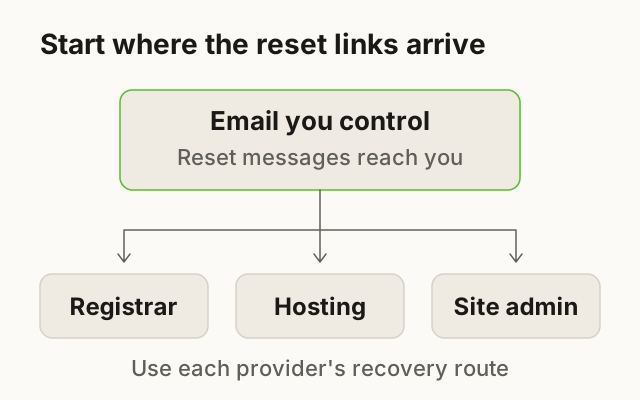
- Get into your own email firstReset links go to an email address, so make sure it is one you control, not the developer's mailbox.
- Find the registrar and recover that accountUse the registrar's own password reset, and if the account is in the developer's name, ask the registrar what it needs to verify you.
- Check the DNS and take a written copyCopy every record as text or a screenshot so any later move can be undone.
- Recover the hosting accountUse the host's reset, or contact the host with the invoices that show you pay for it.
- Recover the site's adminTry the site's own "lost password" link first, then ask the host or a developer about the next option.
- Move the rest to your nameSearch Console, analytics, forms, payments and any paid licences.
On WordPress, "Lost your password?" emails a reset to the address on the account. WordPress's own guide lists other routes, including the database. Most need hosting access and care, so they are a developer's job if you haven't done them before.
On Shopify, only the store owner can transfer ownership, and Shopify sends its messages to the owner's email address. If that address isn't yours, ask the store owner for a transfer or contact Shopify Support. Do not try to recover someone else's mailbox.
For the domain, the registrar deals with the registrant, the person or company listed as its holder. If your developer registered it in their own name, the cleanest route is a polite written request that they transfer it or change the registrant. Moving a domain between registrars needs an authorisation code. ICANN's guide for registrants says registrars must give it to the holder and provide a way to remove a transfer lock. Who the holder is can turn on your contract and local law. This is general information, not legal advice, and we can't promise access will be recovered. For the ownership question itself, see who owns your website.
Close the old access
Once the new logins work and the backup is safe, take the old access away. This is housekeeping, not an accusation: a former developer's login stays a way in until you close it. If the developer is still in touch, tell them first.
Closing the old access
- Change every password on your list, starting with email.An old password may sit in a shared document or a chat history.
- Switch on two-step sign-in on the registrar, hosting and admin accounts.A stolen password alone then isn't enough to get in.
- Remove the developer from the site's admin, the host and the repository.Their user accounts keep working until someone deletes them.
- Remove their Search Console and analytics access, and delete their verification tokens.Google says removing a user does not remove their verification token, so a removed owner could verify again.
- Remove collaborator and staff accounts on stores and payment tools.On Shopify, collaborator access expires after 90 days without a login, and it can be removed sooner in the store's user settings.
- Replace any keys or secrets the developer set up, such as payment or email-sending keys.They may have copies, and a key can't be taken back from someone who has it.
- Put the accounts under a company email address, not a personal one.Then the next person leaving doesn't repeat this problem.
As a benchmark, a handover leaves the code in your account and the hosting, domain and tools in your name. Credentials go in a shared vault, with a written guide. That is what How we work sets out for our own projects. Gaps between that and your list are the gaps to close.
Keep, fix or rebuild: what a review looks at
With access and a backup in hand, a review says whether the site is sound, fixable or better rebuilt. It looks at six things.
| Area | What it checks | A sign it needs work |
|---|---|---|
| Access | Who can log in, and whether every login is in your name | Accounts nobody recognises, shared passwords |
| Backups | Whether a copy is taken, where it goes and whether it has been restored | No backup, or one nobody has opened |
| Updates | Whether the platform, plugins and libraries are on versions their makers still support | Versions several releases behind, or a plugin no longer maintained |
| Speed | How the main pages load on a phone | Slow first load, oversized images |
| Security | Admin accounts, the security certificate and anything exposed that shouldn't be | Old users still active, an expired certificate |
| Forms | Whether a test message reaches a person | Enquiries that vanish or go to an old address |
Ask for the review in writing, with each area marked fine or needing work. A rebuild is not the default. It makes sense when the platform is unsupported, nobody you can hire can work with the code, or fixing it is more work than starting again. Whoever looks after the site next, agree in writing what is covered: what website maintenance should include sets out what to ask for.
Next step: fill in the table above with whatever you know, then tell us what you have. We'll say what we'd look at first, and whether the site is something to keep, fix or rebuild.
Questions
Can I get my domain back if the developer registered it?
Often, but it turns on who is listed as the holder and on the registrar's terms. If a written request to the developer gets no answer, ask the registrar what it needs to verify you. For who owns what beyond the login, see who owns your website.
Do I need the old developer's help?
Not if you can recover the registrar, hosting and admin accounts yourself. If you do ask, ask for three facts: where the site is hosted, which accounts exist and where the files are kept.
How do I find out where my site is hosted?
Search your email and card statements for hosting invoices first. ICANN Lookup also accepts the site's IP address and shows the network operator, which is often the host, though a content delivery service can appear instead.
What if the site is on a website builder?
Then the builder account is the site, so it is the one to recover or move to your name, using the builder's own help pages. The domain may sit with the builder or at a separate registrar, so check both.
Should I rebuild instead?
Not before a review. If only the access was the problem, the site may be fine as it is; the review section above lists what tips it towards fix or rebuild.
Sources
- ICANN Lookup Checked 16 Oct 2026
- ICANN: FAQs for registrants on transferring your domain name Checked 16 Oct 2026
- IANA: Root zone database (top-level domains) Checked 16 Oct 2026
- WordPress: Reset your password Checked 16 Oct 2026
- WordPress: Tools Export screen Checked 16 Oct 2026
- Google Search Console Help: Managing owners, users, and permissions Checked 16 Oct 2026
- Shopify Help Center: Roles managed by Shopify Checked 16 Oct 2026
- Shopify Help Center: Collaborator accounts Checked 16 Oct 2026
Reviewed and edited by Online Scope before publishing. Something out of date? Tell us at info@onlinescope.in. How we write the Blog.