Online storesChecklist
What to settle before you launch your first online store
A platform gives you the settings, not the decisions behind them. These are the ones to settle before you choose where to build.
On this page
To launch an online store, settle seven things first. They are your products, how customers pay, delivery and returns, tax and where you sell, legal pages, connections to your tools, and who runs the store. Then choose the platform. For most stores, that is Shopify.
These are the decisions that hold up a build when they are missing. We're a Shopify Partner and build stores on Shopify. In our e-commerce website development work, we set up payments, shipping and tax and connect your tools, but only once you have decided them.
| Decision | Questions to answer | Who decides |
|---|---|---|
| Products and information | What is a product here? Which variants? Who writes the descriptions, takes the photos and keeps them current? | You |
| Payments | Which methods do your customers use? Who collects cash and marks orders paid? | You, with your payment provider |
| Delivery and returns | Where do you ship, and what do you charge there? What is your return rule and who pays for it? | You |
| Tax and selling abroad | Where must you collect tax? Which countries will you sell to? | You, with your accountant |
| Legal pages | Do your policies match what you really do? | You, with a lawyer |
| Connections | Which tools must the store talk to, and in which direction does the data go? | You decide what; we connect it |
| Day-to-day running | Who handles orders, packing, messages and refunds, and who covers when they are away? | You |
Products and their information
Start from the product list you already have, whether a spreadsheet, a marketplace listing or a catalogue you send on WhatsApp. Then decide what one product means in your store.
- Variants. Shopify treats each combination of options, such as a small blue shirt, as a variant, and you manage inventory for each variant. Decide your options before you load anything.
- Codes. If your accounting or stock sheet already uses product codes, keep them, so one product has one name everywhere.
- Photos and descriptions. Decide who produces them, what each product needs before it can go live, and who approves.
- Selling abroad. Duties and import taxes on international orders are calculated from each product's HS code and country of origin. An HS code is a standard customs code for a type of goods; collect them now if you plan to ship abroad.
Then name the person who keeps prices, stock and descriptions current, because they go stale quietly. If a website already shows these products, the website migration checklist covers what to keep before anything is replaced.
Payments: methods customers expect
Choose the methods your customers already use, such as UPI and cash on delivery. What you can offer depends on your payment provider and country, so ask the provider before you promise a method. Shopify's payments guide says to consider where your business and customers are. Shopify's own payment service is offered only in some countries, not India, so a store there uses a third-party provider.
Shopify handles cash on delivery as a manual payment method: the order stays unpaid until you mark it paid. So decide who collects the cash, records it and marks the order, and what happens when a parcel is refused at the door.
Also settle which bank account receives the money and who checks that payments match orders, usually the person who talks to your accountant.
Delivery and returns
In Shopify, a shipping profile is a set of shipping rules for specific products and locations, with zones and rates inside it. The settings are easy; the decisions behind them are yours.
- Where you ship, and where you do not, at least at launch.
- What you charge in each place, or whether delivery is free.
- Who packs, and with which courier, and how long dispatch takes after an order.
- Your return rule: how many days, which items are final sale, who pays for the return, and whether you refund the original payment or give store credit.
- Refunds on cash orders: how you pay a customer back when they paid in cash.
- Cash on delivery by area: which postcodes or pin codes your courier serves for cash on delivery.
Shopify lets you set up return rules and activate self-serve returns. The rule has to exist first, in plain words.
Tax settings and selling abroad
Shopify says setting up tax is different in each country and describes three general steps: work out where you must collect tax, register there, then start collecting. Take the first two to your accountant; the store is then set up to match what they tell you.
Selling abroad adds decisions, not only a switch. Shopify Markets lets one store set currency, language, products and pricing per country. Before you turn it on, answer these:
- Which countries, and in what order? Start with one.
- Which currency will customers see?
- Which courier ships there, and what do you charge?
- Who pays duties and import taxes: you at checkout, or the customer on arrival? Shopify can collect them at checkout only when certain requirements are met; otherwise you can use a third-party app.
- How does a return from another country work, and who pays for it?
Legal pages
A store needs its policies in place before it takes an order: returns and refunds, shipping, terms of service and privacy. Shopify can generate return and refund, terms of service and shipping policies from your store settings, and new stores keep the privacy policy updated automatically by default.
Treat generated text as a starting point. Shopify says the templates are not legal advice and that you are responsible for your published policies. Have a lawyer read them for your country, and check each says what you actually do, such as the return window you decided above.
What the store connects to
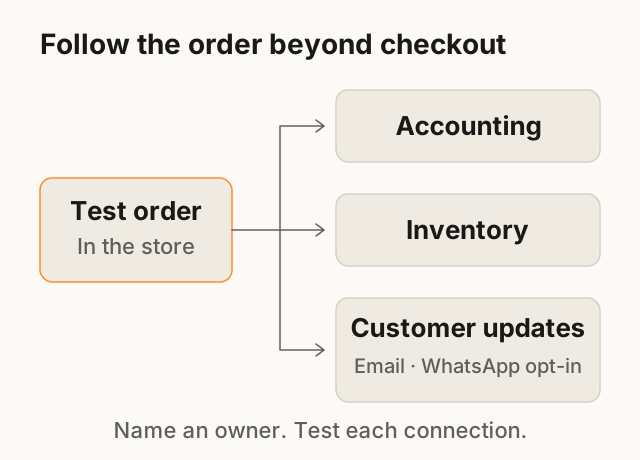
A store that stands alone creates work: someone retypes orders into the accounts and corrects stock by hand. List the tools that run your business, and decide what moves between them and in which direction.
- Accounting. Where do orders and payments need to land, and who reconciles them?
- Inventory. If you also sell in a shop or on a marketplace, pick the one place where the stock number is true.
- Email. When a customer orders, Shopify sends an order confirmation email. Decide what else customers should hear from you, such as a dispatch update, and who writes it.
- WhatsApp. Order updates can also go by WhatsApp. Meta requires that businesses obtain opt-in before messaging people on WhatsApp, so decide where customers agree to it.
Give each connection an owner and a clearly marked test order. Follow it through every tool using the provider's test mode where available. Prevent test orders from triggering real fulfilment or customer messages; arrange any live payment check separately.
Who runs it day to day
We build the store and connect it, and your team gets a walkthrough at handover. You run it: orders, fulfilment, customer service, ads and marketplace listings.
So give each daily task a name: who sees a new order, packs it, answers a customer, issues a refund, changes a price. Then name a backup for each, because a store with one person who knows everything stops when they are away. Keep the store account and domain in the business's name: what to do when a developer leaves shows why.
Then the platform: Shopify for most stores
Choose the platform last, because the decisions above tell you what it must do. For most stores, we recommend Shopify: it is reliable, and your team can run it without a developer.
A custom build is for products, pricing or workflow a platform can't handle. An unusual flow, such as a quote and an approval before payment, is a reason to check the platform's settings and apps first, not proof you need custom. If the tested options don't fit, we work it out with you in Discovery & Scope rather than guess.
Other platforms exist too, WooCommerce for WordPress among them; the Shopify or WooCommerce comparison sets the two side by side. To put your constraints on one page for a developer, the table above is the core of a website project brief.
Bring this to the call
- Your product list, with variants, and what you have for photos and descriptions.
- Where you sell today, and what you want to keep selling there.
- The places you plan to ship to at launch, and your return rule if you have one.
- The tools you use for accounts, stock, email and WhatsApp.
- The name of the person who will run the store each day.
Next step: fill in the table, mark anything undecided as "Not decided", and tell us about the store. We'll reply within 24 hours with questions or a time for a call, and a written quote follows.
Questions
Do I need Shopify Plus?
Not as a starting assumption. Shopify describes Plus as a plan for businesses selling in high volume; if your store needs more than a standard plan, the written quote should say so and why.
Can I sell abroad from day one?
The settings allow it, but each country adds its own shipping, tax, duties and returns decisions. Launch in one, and add the next once those run smoothly.
Who updates products after launch?
Your team, in the store's admin, without a developer. Name the person before launch, so it is not left to chance.
Can the store send WhatsApp order updates?
Yes, as an addition to Shopify's own order confirmation email. Customers must opt in first, so decide where they agree, for example a box at checkout.
Sources
- Shopify Help Center: Product variants Checked 16 Oct 2026
- Shopify Help Center: Payments Checked 16 Oct 2026
- Shopify Help Center: Manual payment methods Checked 16 Oct 2026
- Shopify Help Center: Shipping profiles Checked 16 Oct 2026
- Shopify Help Center: Refunds and returns Checked 16 Oct 2026
- Shopify Help Center: General tax set-up steps Checked 16 Oct 2026
- Shopify Help Center: Getting started with Markets Checked 16 Oct 2026
- Shopify Help Center: Collecting duties and import taxes at checkout Checked 16 Oct 2026
- Shopify Help Center: Adding store policies Checked 16 Oct 2026
- Shopify Help Center: Customer notifications Checked 16 Oct 2026
- Shopify Help Center: Shopify Plus plan Checked 25 Oct 2026
- Shopify Help Center: Shopify Payments supported countries Checked 25 Oct 2026
- Meta for Developers: Getting opt-in on WhatsApp Checked 16 Oct 2026
Reviewed and edited by Online Scope before publishing. Something out of date? Tell us at info@onlinescope.in. How we write the Blog.