After launchGuide
What website maintenance includes, and what to get in writing
A support arrangement is only as useful as what it puts in writing. Here is what it usually covers, what it leaves out, and the lines to agree before you sign.
On this page
Website maintenance is the regular work that keeps a live site secure, working and up to date. It usually includes updates, security patches, backups, monitoring and fixes when something stops working. It usually leaves out new features, design changes, content writing and marketing. What matters most is that all of it is written down.
This page is for the owner of a live site or app, built by us or by someone else. You are deciding whether to sign a support arrangement and what it should say. Our own version is on the website maintenance and support page.
Why a live site needs looking after
A site that works today sits on software its makers keep changing: the platform, the plugins, the libraries, the server. When those move and your site doesn't, small problems appear. A form stops sending, or a login breaks after a platform update.
Some updates happen without you. WordPress, for example, applies minor core releases automatically by default, but plugin and theme updates are generally left to you unless switched on. Support covers that gap: someone whose job it is to notice and act, and a record of what they did.
If nobody can say who holds the backups or the logins, fix that first: see what to do when your developer left and you can't get in.
What support usually covers
A written arrangement should say which of these are in. Our support page lists fixes, updates and security patches, small improvements, monitoring and backups, and content changes if you'd rather we do them. Larger upgrades are quoted separately.
- Fixes. Something that worked and has stopped: a form that no longer sends, a page that errors, a payment step that fails.
- Updates and security patches. For the platform and its parts, applied and then checked, ideally on a private copy of the site first, so an update doesn't break a page unnoticed.
- Monitoring. Someone is told when the site goes down or a key page stops loading, rather than a customer telling you first.
- Backups. A regular copy of the site, taken somewhere other than the server it lives on, and tested by restoring it now and then.
- Renewals. The domain, the security certificate and any paid licences, with their dates written down, so nothing lapses quietly.
- Small content changes. Swapping a photo, correcting a line or changing an opening time, if you'd rather not do it yourself.
- A short summary. What was done, and what to plan for next.
On backups, ask where the copies go and whether anyone has restored one. WordPress's upgrade guide says to verify backups are there and usable. CISA suggests the 3-2-1 rule: three copies, on two kinds of storage, one kept away from your business location. A restore test checks whether the copies are usable before you depend on them.
What it leaves out, and what is quoted separately
Support keeps what exists in good shape. Content writing, marketing and anything not written down are usually out. New features, redesigns, platform moves, new connections and bigger upgrades get their own written quote, so support stays predictable. If a support quote includes marketing or SEO campaigns, ask who does that work and where it is written; we don't offer them.
| Usually covered | Usually not covered | Quoted separately |
|---|---|---|
| Fixing a form that stopped sending | Writing new page copy or product descriptions | A new feature, such as online booking |
| Applying platform and plugin updates, then checking the site | Marketing and social media management | A redesign of the homepage or the whole site |
| Security patches | SEO campaigns | Moving to a new platform |
| Taking and testing backups | Running ads | Connecting a new tool or system |
| Monitoring that the site is up | Unlimited changes of any kind | A larger upgrade of the software |
| A small content change, if the agreement lists it | Anything not written down | A new section or report that is bigger than the agreement's small improvements |
The edge between the columns moves from one provider to the next. Where a job could sit in two columns, such as a small improvement, the agreement should say which.
A bug or a change request: how to tell
Many arguments about support come down to one question: is this a bug, or a change?
- A bug is something that used to work, or was built to work, and doesn't. The contact form isn't sending on phones.
- A change request is something that works as built, and you want it to work differently. You want one more field on the form.
A bug is normally fixed under support. A change is covered only if the agreement lists small improvements; otherwise it is quoted. If you can't tell, describe what you expected and what you saw, and ask the provider to say which it is and why.
Response times are set per client and written down
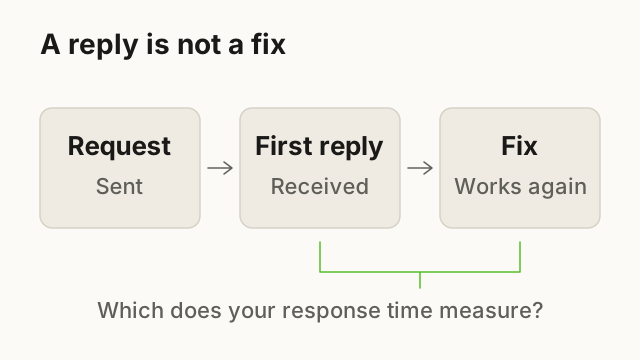
Response times are not a standard number. They depend on the site, how much the business relies on it and what has been agreed. Ours are set per client and written down. When you read a response time, check four things:
- What is being measured. A first reply and a fix are different. The agreement should say which one the time refers to.
- Which days count. Response is stated in working days. Check which days those are, and whose calendar and time zone apply.
- Whether urgent problems are treated differently. A checkout that has stopped working is not the same as a typo.
- How you will know a request was received. An acknowledgement you can see saves a second message.
A reply to an enquiry before you are a client is not a support response time. Only the second belongs in a support agreement.
How requests are sent
Use one channel, named in the agreement. Requests spread across email, chat and phone get lost; one channel gives you a record and the person looking after the site a queue.
A good request is short and specific: what happened, on which page, on which device, and what you expected. A screenshot helps. For example, a bakery owner might write, "The order form doesn't send from my phone. It worked last week."
Monthly hours or a fixed list
Support is usually organised in one of two ways:
- Monthly hours. A set amount of time each month for requests. It suits a site that changes often, but ask what happens to hours you don't use and what happens when the hours run out.
- A fixed list. Named tasks done regularly: updates, backups, a monitoring check, a monthly summary. It suits a site that mostly needs to stay as it is, and it is easy to check.
Either way, the price belongs in the agreement. When you compare arrangements, compare what is in each line, not only the total.
- Coverage
- Fixes, updates and security patches, monitoring and backups. Small content changes listed by name.
- Response time on working days
- Written here, set for this client.
- How requests are sent
- One channel, named here: for example, one email address.
- Monthly hours or a fixed list
- One of the two, written here.
- Price
- Written in the agreement.
- Renewal date
- A date written here.
Sample only. These are the six lines our support page lists; the values show what each line should hold, with no amounts or times.
Renewal, and what you keep if you stop
Agree how support ends before it starts: a written renewal date, the notice either side gives, and what happens to requests still open on the last day. More important is what you hold when it ends:
What you should still have if support stops
- The domain, hosting and site admin accounts are in your name.Otherwise stopping support can mean losing access to your own site.
- You can get a recent backup, held somewhere you control.The provider's copy is no use to you if you can't reach it.
- Credentials are stored in a password manager or vault the business controls.So the next person doesn't start by guessing.
- The monthly summaries are kept.They are the record of what was changed and what was planned.
If you took on a site someone else built, start with a short review of its access, backups, updates, speed, security and forms.
Next step: write down what you have, who built it and what has gone wrong in the last year. Tell us, and we'll say what we would cover, what we would quote separately, and whether you need a standing arrangement at all.
Questions
What's the difference between a bug and a change?
If it used to work, or was built to work, and doesn't, it's a bug. If it works as built and you want it different, it's a change, covered only when the agreement lists small improvements.
Who should hold the backups?
The provider may take them, but you should be able to reach a recent copy in an account you control. Ask when one was last restored, not only when one was last taken.
Can support start without a project?
Yes. For a site or app we didn't build, we review it first, in writing, then propose an arrangement or say plainly that a rebuild would suit you better.
Does every website need maintenance?
Every live site needs someone to act when it breaks, but not always a standing arrangement. The note above on when support may be more than you need sets out the cases.
What happens when we need something bigger than support covers?
It gets its own written proposal, with what's included and what isn't. Nothing starts until you've agreed to it in writing.
Sources
Reviewed and edited by Online Scope before publishing. Something out of date? Tell us at info@onlinescope.in. How we write the Blog.