SoftwareDecision guide
When a spreadsheet is enough, and when to build an internal tool
A spreadsheet that causes errors is a reason to change, but not automatically a reason to build. Check the options in order: keep, buy, then build.
On this page
Replace a spreadsheet with custom software only when the sheet can't do what the work needs, and the ready-made products you have tested can't either. The signs are lost edits, costly mistakes, no view of what stage things are at, or people who should see different things. Each sign is first a reason to check whether a ready-made or low-code product handles it. Build when the process is your own and those products don't fit.
We build internal tools and client portals as part of our custom software development work. We would rather you hear the case for keeping or buying from us first.
Most spreadsheets are fine
A spreadsheet is quick to change, everyone knows how it works, and there is nothing to install. While a mistake is easy to spot and fix, it is hard to beat.
Take a bakery that tracks its weekly cake orders in one sheet. If a date is wrong, someone notices on the next call and corrects the cell, and nothing is lost. That sheet does not need to become software.
Signs it has stopped being enough
A spreadsheet stops being enough one habit at a time. These are the six signs we would look for.
- Several people edit the same records. Two people change the same row, and one change is lost. Someone saves a copy called "final v3" and nobody knows which file is current.
- Mistakes cost money. A wrong quantity ships. An approval is missed. A slot is booked twice. Tracing the cause is guesswork. Google's own help page notes that a cell's edit history may not show added or deleted rows and columns, formatting changes or changes made by formulas.
- You can't see what stage something is at. The honest answer to "did the Tuesday order go out?" is a message in a WhatsApp group.
- Different people should see different things. A supplier should not see your margins, and a field worker should not see other clients. A spreadsheet shares one file. Google says that protecting a sheet shouldn't be used as a security measure, because people can still copy, print and export it.
- Nobody touches the formulas. One person built them, and changing a column now feels risky. If that person leaves, so does the understanding.
- The records have a life of their own. An order, an approval or a booking moves through stages, passes between people and needs a history. A spreadsheet holds a list. It does not know what should happen next.
A sign that structure fixes is a reason to tidy. A sign that needs permissions, a change history or stages is a requirement: check whether a ready-made or low-code product meets it before you build.
| If this is true | Then |
|---|---|
| The trouble is untidiness: mistakes are rare and easy to trace | Keep and tidy. Add structure: one row per record, a status dropdown, an owner, a backup copy. |
| You need permissions, outside logins, a change history or stages, and the process is common, such as invoicing, stock or booking | Buy first. Test ready-made and low-code products with real records: permissions, client or supplier logins, change history, export and connections. |
| You tested products against those needs, and the process is your own: your approval steps, your mix of people, your rules on who sees what | Build. A tool shaped around how your team works, starting with a small first release. |
| You bought a tool and still keep a spreadsheet next to it to get the real work done | Change the tool, or build. The workaround shows where the tool does not fit. |
| Leave it aloneMistakes are rare and easy to fix, and everyone who uses the sheet understands it | Keep it, and tidy it. |
Three options: keep and tidy, buy, build
Keep and tidy
Give the sheet a header row and no merged cells, and one tab per kind of thing, such as orders, customers and prices. Turn free-text status into a dropdown. Add a short "read me" tab saying what each column means and who owns the sheet. Keep a dated copy somewhere safe.
Buy
If your process is a common one, someone has probably built a tool for it. Ready-made and low-code products can include permissions, logins for clients or suppliers, and a change history; some work from the spreadsheet you already have. You get something that works, kept up to date by the supplier. The trade is that you work the way the tool works. If you find yourself bending the process to fit, look at the next option.
Build
Build when the process is yours and the products you tested don't fit: your approval steps, your mix of people, your rules about who sees what. A tool built for it is a web application that opens in the browser on a phone, a tablet or a computer. We don't build native mobile apps at the moment.
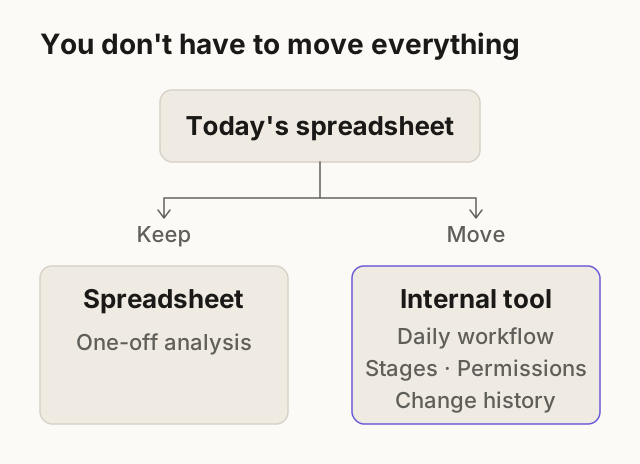
You don't have to build all of it. Often one tool removes the daily friction while the spreadsheet keeps doing what it does well, such as one-off analysis.
If you buy: what to check
Try the tool with realistic, anonymised records and the people who will use it, then go through this list. Check its data handling before importing customer information.
Before you commit to an off-the-shelf tool
- Can you export all of your data, whenever you like, in a file you can open?A CSV or spreadsheet file is the test. If your records only live inside the tool, leaving it later means starting again.
- Is the account in your name, with a second person who can get in?Tools set up by a freelancer often sit under their email. Our guide to what to do when a developer leaves shows how to find out whose account it is.
- Does it connect to what you already use?Your forms, email, accounting and WhatsApp should feed it, not be retyped into it. Connecting tools in the right order is its own step, covered in our guide to lead follow-up automation.
- Can different people see different things?Check the permissions with a real example: can a supplier see only their own orders?
- Will it hold up when your process changes?Ask what happens when you add a step or a second location. A tool that needs a workaround on day one will need more later.
If you build: what the first release holds and what waits
Software projects go wrong when the scope is a wish list. So settle four things first: who the users are, what they do today, what the first release must do, and what waits. The first release holds the one workflow that causes the daily friction.
For larger or less defined tools, we start with Discovery & Scope. It is a short, paid engagement that ends in a written scope, plan and estimate you own and can take to anyone. A smaller tool needs a short conversation and a written proposal. How we work explains both.
- Included
- One order form used by the wholesale desk and the store team. A status on every order: New, Approved, Packed, Sent. An approver who sees only the orders waiting on them. A history of who changed what, and when.
- Waits
- Invoicing. Reports. A portal for wholesale customers. Reminders. Moving in the old sheets, beyond the orders still open.
- What we need from you
- One person who can make decisions. A list of who does what today. Three anonymised orders, followed from start to finish. A redacted copy of the current sheet.
A hypothetical example, not a client. A real sheet is written with you and goes into the written scope.
Scope changes a little once people use the first release. Changes are written up with their effect on time and price, and built only after you approve them. On payment, the code, design and accounts are yours, as the agreement says.
Bring this to the call
If the answer looks like build, rough notes are fine; the sheet itself is the most useful item.
Bring this to the call
- A copy of the spreadsheet with customer details, credentials and confidential figures removed. Keep the columns and sample rows that explain the work.
- Who uses it, and what each person does in it.
- Where it goes wrong: the last two or three mistakes, and what they led to.
- What other tools and message groups it depends on, such as email, accounting and WhatsApp.
- Who should see what, and who can approve.
- The one thing you would fix first.
Next step: describe what your team does by hand, with a redacted sample of the sheet if useful. We'll say whether we would keep it, buy something or build, and what the first release would hold.
Questions
Is custom software always more work to look after?
Any tool needs looking after: hosting, updates and the occasional fix. A spreadsheet needs it too, but the work is hidden in whoever maintains the formulas. A bought tool moves that work to the supplier.
Can we keep the spreadsheet for some of it?
Yes, and often you should. A tool can read from and write to a spreadsheet where that helps.
Will it work on phones?
Yes, in the browser. A manager in the office and a person on the road use the same screen, without a separate app.
What if we're not sure what we need?
That is what the first conversation is for. Tell us what your team does by hand today. For larger or less defined tools, Discovery & Scope ends in a written scope you own.
How much does it cost to replace a spreadsheet with software?
It depends on what you need. Tell us about the project and we'll send a written quote with the scope, timeline and what's included. For larger or less defined tools, Discovery & Scope comes first and ends in an estimate you own.
Sources
Reviewed and edited by Online Scope before publishing. Something out of date? Tell us at info@onlinescope.in. How we write the Blog.