WebsitesChecklist
Website migration checklist: what a redesign or platform move must keep
A redesign or a platform move can quietly break what visitors and search engines already rely on. This is what to keep, and when to check it.
On this page
A website migration checklist comes down to six things to keep. Keep your page addresses (or a redirect from each old one), your forms, and your analytics and Search Console access. Keep your titles and descriptions, your images and files, and your structured data. Plan the redirect map before design starts, record a baseline before the switch, and check the same list after launch.
A migration here is a redesign with new page addresses, a move to another platform, or a move off a site builder. The list is the same in each case. Our website design and development work runs these checks before launch, alongside speed, phones, accessibility and legal pages.
| Item | Why it matters | How to check |
|---|---|---|
| Page addresses | People, bookmarks and other sites still use them. A missing one is a dead end. | Open every old address on staging. Each should land on its replacement. |
| Redirects | They send visitors and Google to the new page in one step. | Test that each old address reaches its final page in one hop, with a permanent (301 or 308) redirect, and that the final page loads normally (status 200). |
| Forms | Enquiries fail quietly when a form posts to an old address. | Send a marked test message, with your own details, through every form. Check the inbox, the reply email and the thank-you page. |
| Analytics | Without it you cannot compare before and after. | Visit the live site and watch the visit appear. Check form and phone events too. |
| Search Console | It holds your search history and lets you submit the new sitemap. | Confirm ownership still verifies on the new site. |
| Titles and descriptions | They are what people read in search results. | Compare each main page with your baseline sheet. |
| Structured data | It gives search engines your business details in a form they can read. | Run the key pages through Google's Rich Results Test. |
| Images and files | Pages and other sites link to them directly. | Open each file address. Check that images load and descriptions came across. |
| Links inside content | Old links that rely on redirects are an extra step that can break later. | Click through the main pages. Point links at the new addresses. |
| Legal pages and cookie notice | They must not disappear in the move. | Open each one from the footer and from the form it relates to. |
| Backups | They are your way back if launch goes wrong. | Back up the old site and restore the copy somewhere separate, so you know the way back works. |
| Search-engine block | A block left on from staging hides the new site. | After launch, check robots.txt and the page tags are open. |
Take a baseline first
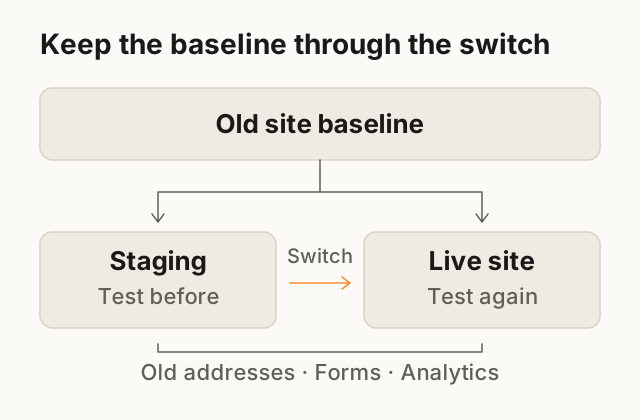
Before anything changes, write down how the current site behaves: if you don't know what worked, you can't tell what broke. Keep it on one sheet; it becomes your redirect map and your after-launch check.
- Page list. Every address from the sitemap, the content system, your analytics and Search Console. Google recommends building the list from several sources, including images and downloads.
- Pages that matter. The ones that get visits, bring enquiries or are linked from other sites.
- Enquiries. How many arrive in a normal month by form, phone, WhatsApp and email, and where each one lands.
- Words and settings. The title, description and main heading of each page that matters, plus a full backup of the site and its database.
URLs and redirects: every address with value keeps working
A permanent redirect is a server-side instruction that sends anyone asking for an old address to a new one. Google treats 301 and 308 as the permanent kinds, so either is fine, and recommends server-side redirects over JavaScript ones.
Map one-to-one: each old address with value goes to the single new page that replaces it. Sending everything to the home page helps nobody. Google also says to avoid chaining redirects, where A goes to B and B to C. Send A straight to C.
Make the map before design starts, while merged, renamed and dropped pages are still a sketch. A page you remove for good should return a proper "not found" or "gone" response, not a redirect to something unrelated.
Keep the redirects live: Google suggests generally at least a year. If the domain itself changes, Search Console's Change of Address tool also applies; it is not needed when only the paths change.
- `/shop/blue-loaf`
/breads/blue-loaf(301)- `/about-us`
/about(301)- `/contact.html`
/contact(301)- `/menu-2019.pdf`
/menu(301), because the old PDF is replaced by a page- `/summer-offer`
- Removed on purpose: returns "gone", no redirect
Sample only. bakery.example is not a real business, and a real map has one row for every address with value. A 308 works as well as a 301.
Forms: every one, and where its submissions go
Forms are where a move loses enquiries quietly. A form can look perfect on the new site and still send its messages to an address nobody reads. Write down each one.
For each form, record
- Where it appears: contact page, quote request, booking request, footer.Some forms sit on pages that are not in the menu.
- Where submissions go: the inbox or tool, and who reads it.The new form must reach the same person on day one.
- Who else receives a copy.A second recipient is often set up once and forgotten.
- The confirmation email the sender gets, with its wording and sender address.People notice when the reply stops arriving.
- The spam protection in use, and whether it carries over.It helps keep automated submissions out of the inbox.
- The thank-you page and any tracking attached to it.It is often where an enquiry is counted.
Then test. Send a clearly marked test message through every form on staging, and again right after launch. Use your own details, never a customer's. Check it lands in the inbox, not spam: mail from a new server can be distrusted unless the domain's email settings allow it.
Analytics and Search Console: keep access and keep measuring
If you use analytics, carry its configuration and consent choices across from day one so the before-and-after comparison stays useful. Check that you own the account, the tag is on every new page, and form, phone and booking events still fire. If you can't sign in at all, start with what to do when your developer has left.
Search Console verifies ownership with a file, a meta tag, an analytics or tag manager snippet, or a DNS record, and checks periodically that it is still there. If the new site drops the tag or file, you can lose access to your own search data. Keep the DNS record, or add a second method.
When the redirects are live, submit the new sitemap. To compare old and new URL counts in Search Console, keep the old sitemap available during monitoring. Google also permits removing it after the new sitemap is submitted.
Titles, descriptions and structured data
Carry over the title and description of each page that already performs. Improve them on purpose, not by accident: a new template can quietly replace them with defaults.
Structured data is markup that describes a page to search engines, such as your business details or a product. Carry over what the old site has and test it with Google's Rich Results Test. Each new page should also point to itself as its canonical address, as Google's site-move guidance advises.
Images, PDFs and links inside content
Images and files have addresses too, and Google's guidance includes them in the list to map. Look for the PDFs people download, such as brochures and menus, because other sites link straight to them.
Then fix the links inside your own pages. Point them at the new addresses rather than relying on redirects, and check embedded maps, videos and booking widgets.
What the old site did that nobody wrote down
Old sites pick up quiet jobs over the years. Ask whoever answers enquiries, and look in the hosting account too, because some of these live only there.
- Notification emails that go to a second person.
- A form connected to a spreadsheet, a CRM or a calendar.
- Automatic replies and confirmation emails.
- Redirects set up at the host years ago.
- Email records in the domain's settings. If the name servers move, copy the email records first, or business email stops arriving.
- Legal pages and the cookie notice.
- A tracking tag someone added and never documented.
- A page that is not in the menu but is printed on a flyer or in an email signature.
- Scheduled backups.
Anything on this list that the new site does not do is a gap. Decide on purpose whether to rebuild it or retire it.
Staging and launch
A staging site is a private copy of the new site where you can test before anyone else sees it. It is usually hidden from search engines, and Google's site-move guide reminds you to remove any noindex or robots.txt block at launch.
- Freeze content changesAgree a short window when nobody edits the old site, so nothing is lost in the copy.
- Take a final backup and agree the way backBack up the old site and its database, prove the copy restores, and agree who decides to switch back and how.
- Switch and turn the redirects onDo it at an agreed time, with the person who can fix the domain settings available.
- Test the old addressesOpen every address on the map and check that it lands on the page you expect.
- Send a message through every formConfirm each one arrives and the sender gets a reply.
- Watch a live visit appearOpen the site on your phone and check that analytics records the visit.
The first days after launch
Google says to expect temporary fluctuation in rankings during a move, and a few weeks or more before a medium-sized site's new addresses show. Judge the result after weeks, not on day two.
In the first days
- Re-run the old-address test on the live site.Launch-day fixes sometimes undo a redirect.
- Send another test through every form.A change made after launch can break a form.
- Check analytics against your baseline.A gap in the data is easier to explain the same week.
- Check Search Console's sitemap and indexing reports.Google suggests watching the old sitemap's pages fall and the new one's rise.
- Add redirects for any missed address you find.Every missed address is a visitor who got a dead end.
- Compare enquiries with your baseline month.It is the number that matters to the business.
Once you know what the new site must keep, a one-page website project brief describes what you want from it. If the move involves a store, see launching a first online store.
Next step: tell us about the project, with the address of your current site and what you want to change. We'll reply with what the move needs to keep.
Questions
Can you redesign a website without losing search rankings?
The risk can be reduced but not guaranteed away. Keeping or redirecting addresses one-to-one and carrying titles across does most of the work; Google still says to expect temporary fluctuation during a move.
How long should the redirects stay in place?
Google suggests keeping them for as long as possible, generally at least a year, and considering keeping them indefinitely. Old links on other sites and in printed material keep arriving long after launch.
Do I need to tell Google if I change platform but keep my domain?
Google's Change of Address tool is for a change of domain or subdomain, not for path changes on the same domain. You should still submit the new sitemap, keep Search Console verified and check the reports after launch.
What should I do with old pages that have no equivalent on the new site?
Let it return a proper not-found or gone response, as Google advises for content you are not moving. Redirect only to a page that genuinely replaces it; the sample map above shows both cases.
Sources
- Google Search Central: Site moves with URL changes Checked 16 Oct 2026
- Google Search Central: Redirects and Google Search Checked 16 Oct 2026
- Google Search Console Help: Verify your site ownership Checked 16 Oct 2026
Reviewed and edited by Online Scope before publishing. Something out of date? Tell us at info@onlinescope.in. How we write the Blog.